Kestrel General Trading — Wholesale & Trading Company Website + Back Office (Quotes, Invoicing, Inventory, Purchasing, Payroll)
A wholesale & trading company website with a complete back office. Staff sign in to manage products and inventory, customers and vendors, quotes, invoices, payments and returns, purchase orders and receiving, expenses, payroll and reports. Sales tax with tax-exempt customers. Invoices print on Letter/A4, 80 mm thermal or NCR multi-part forms. Runs on your own database.
Preview
What you can customize
Each section below becomes a guided form field in your library after purchase — no prompting experience required.
- 1
Home
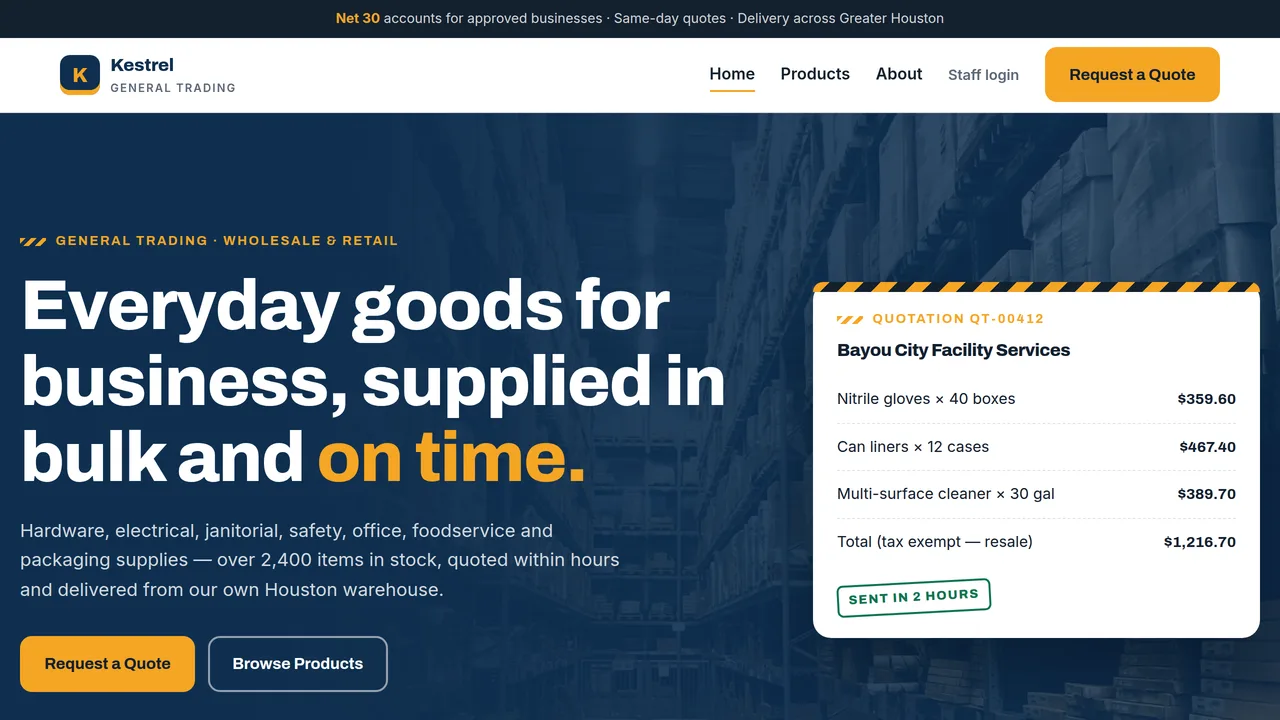
Hero with example quotation, stats, 8 product categories, how ordering works, fast-moving products, sectors, sourcing and a testimonial.
2 editable fields
- 2
Products
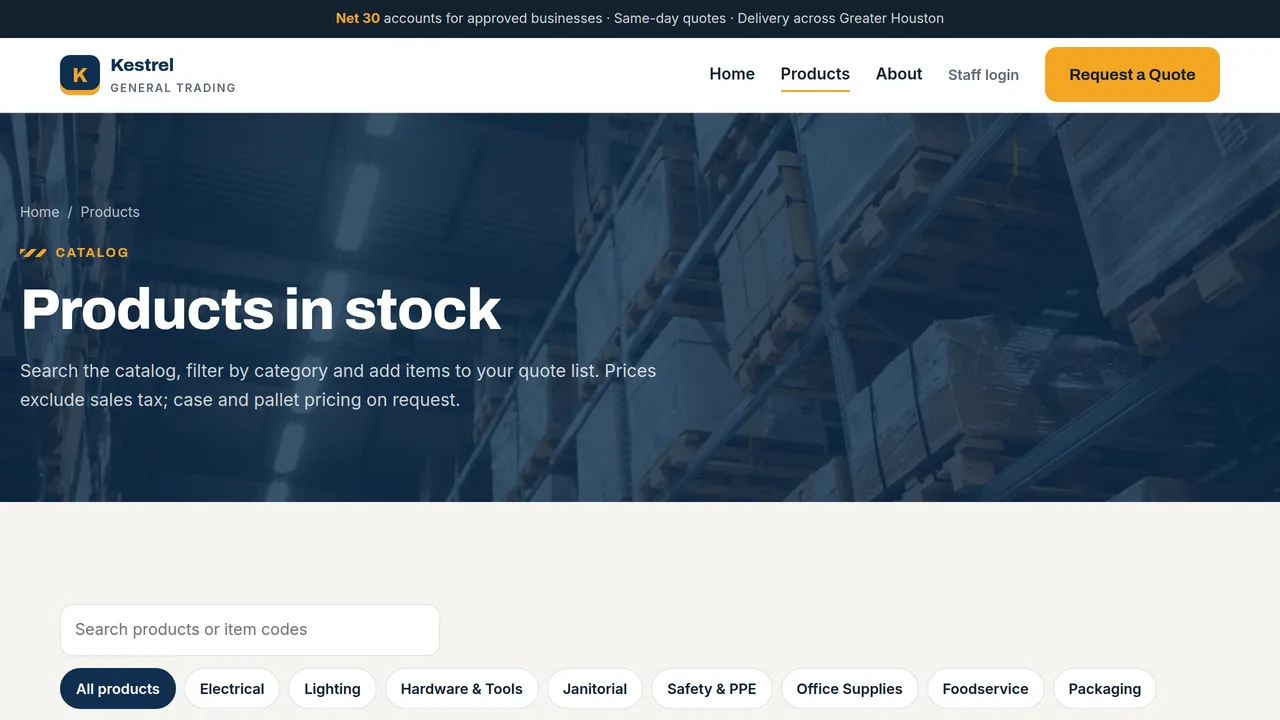
Live product catalog with search, category filters and an 'Add to quote' list, plus a special-orders section.
2 editable fields
- 3
About
Company story, key numbers, four values, warehouse and delivery photos, and trade accounts.
2 editable fields
- 4
Request a Quote
Real quote-request form that pre-fills from the visitor's quote list and lands in the back office, plus contact details and a delivery & payment FAQ.
2 editable fields
- 5
Back Office
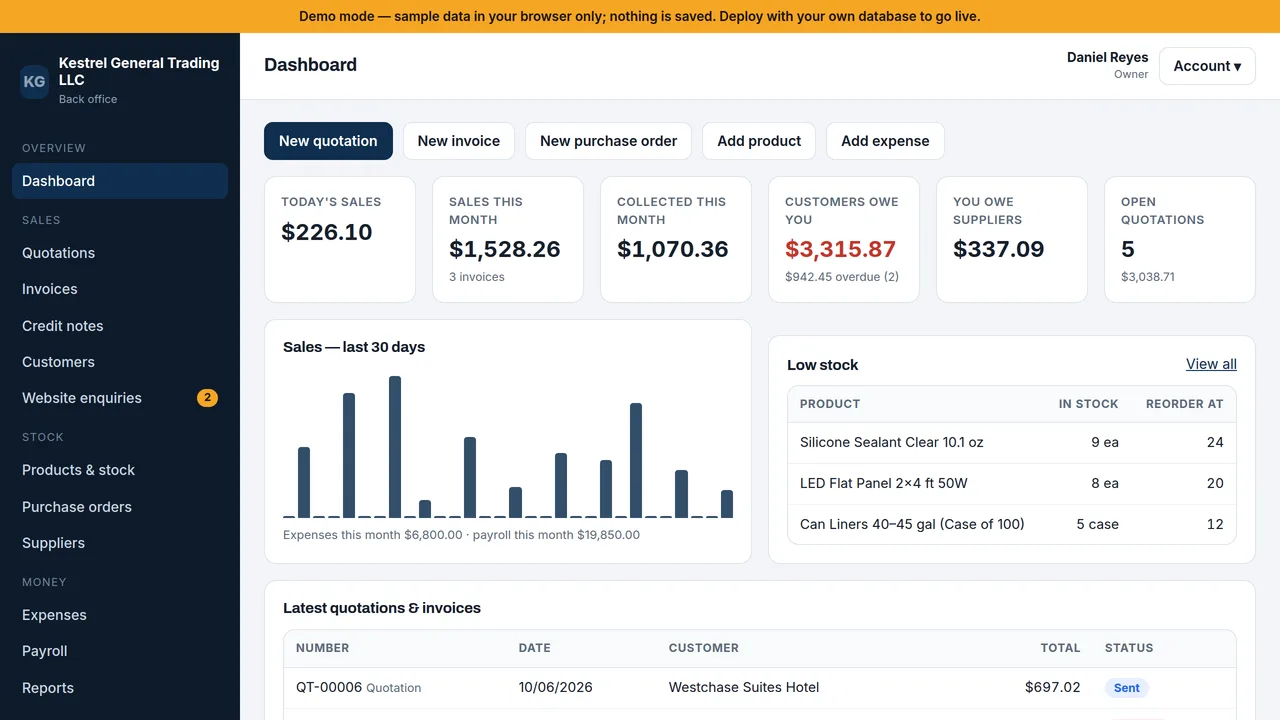
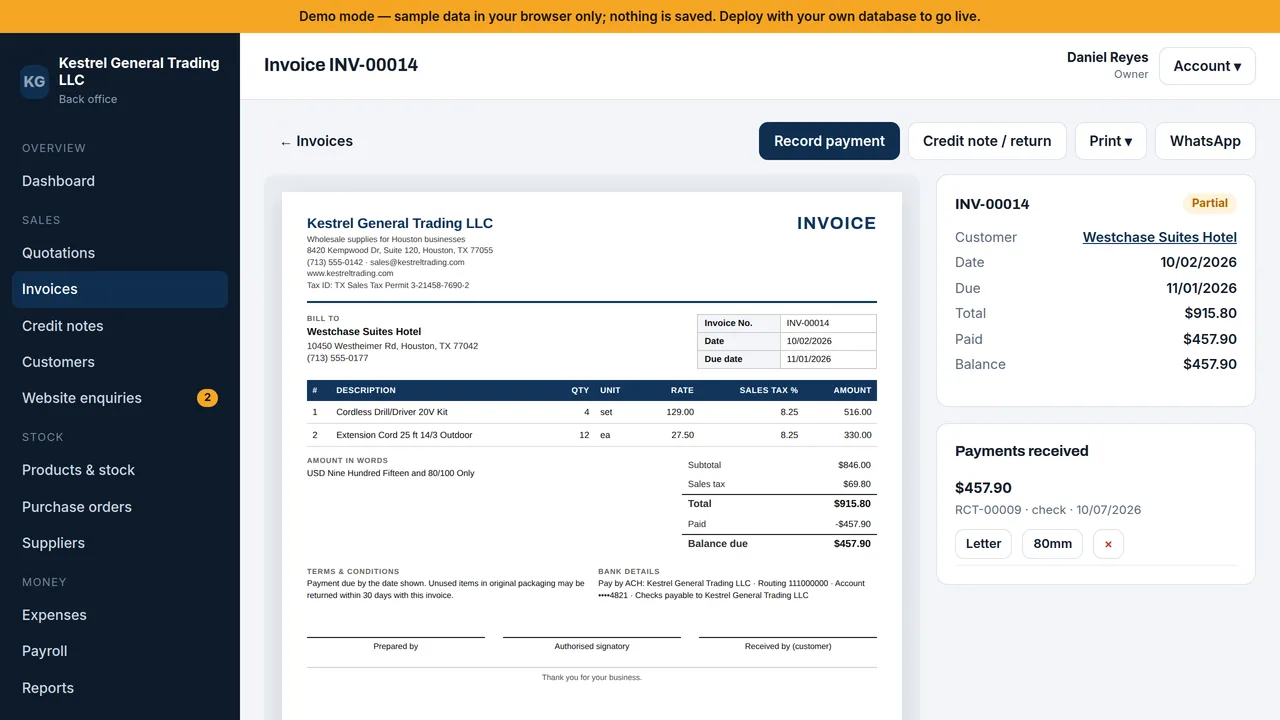
Staff back office: dashboard, quotations, invoices, credit notes, customers, enquiries, products & stock, purchase orders, suppliers, expenses, payroll, reports, settings and users — with A4, 80 mm and NCR printing. Runs on sample data in this preview.
2 editable fields
Backend structure
Exactly what ships behind the pages above — every file below is real, working code included in your download, not a mockup.
package.jsonProject configapi/_lib/core.tsAPI endpointapi/auth.tsAPI endpointapi/products.tsAPI endpointapi/parties.tsAPI endpointapi/sales.tsAPI endpointapi/purchases.tsAPI endpointapi/payroll.tsAPI endpointapi/expenses.tsAPI endpointapi/reports.tsAPI endpointapi/enquiries.tsAPI endpointschema.sqlDatabase schema
This is a Dynamic Website — a real backend (database + API) is included, not just static pages. It connects to your own database (Vercel Postgres, Supabase, Neon, or similar); this platform never sees or stores the data it collects. Set these on your own Vercel project before deploying:
DATABASE_URL— requiredTRADING_ADMIN_KEY— required
Once deployed, your purchase's library page shows a “Manage live data” panel that lists, and lets you act on, submissions from /api/enquiries — directly from your deployed site, no separate database tool needed.
It also manages Products — add, edit and delete them through /api/products, including photos uploaded from your computer.
Through the editor you can add new optional fields to what's already here (for example, a note field on a booking). Building entirely new features or custom logic isn't something the editor automates — every purchase includes the full source code (frontend and backend, no lock-in), so you or a developer you hire can extend it freely outside the platform.
Launching it is simple: download the files, publish it live to your own Vercel account, or push it to your own GitHub — see how to launch your AI Tapz website.
Usage instructions
A wholesale / trading company website AND its back office in one — 4 public pages plus app.html, a full staff back office that runs on YOUR OWN database. Built for small distributors and trading companies that quote, invoice, buy and pay staff from spreadsheets and carbon-copy books today. Set up for the US market: USD, sales tax, tax-exempt resale customers, US Letter paper and MM/DD/YYYY dates (each one changeable in Settings). PUBLIC WEBSITE (edit freely in the visual / AI editor) 1. Home (index.html) — hero with an example quote, stats, 8 product categories, how ordering works, fast-moving products, customer sectors, sourcing, testimonial. 2. Products (products.html) — searchable catalog with category filters. Shows 16 sample products until you add your own in the back office; then your live list (photos, categories, prices) replaces them automatically. Visitors build a "quote list" as they browse. 3. About (about.html) — story, numbers, values, warehouse & delivery, Net 30 business accounts. 4. Request a Quote (quote.html) — a real form, pre-filled from the visitor's quote list. Every request lands in the back office under "Website enquiries", where one click turns it into a quotation. BACK OFFICE (app.html — staff sign-in) - Dashboard: today's and this month's sales, money owed to you and by you, overdue invoices, open quotes, low stock, 30-day sales chart. - Products & stock: photo, SKU, UPC/barcode, unit, price, cost, tax rate and reorder point; opening stock; adjustments with reasons; full movement history; CSV import & export; archive instead of delete. - Customers & suppliers: contacts, tax IDs, payment terms (e.g. Net 30), credit limits, a sales-tax-exempt flag for resale / exemption certificates, live balances and a printable statement of account. - Quotations: build with product search or barcode scan, line discounts and sales tax; mark sent / accepted / rejected; convert to an invoice in one click. - Invoices: drafts (print as proforma) or issued (numbered with no gaps, stock taken out automatically); payments with partial payments; credit memos / returns that put stock back; void with stock reversal. - Purchase orders: order from suppliers, receive goods in part or full (receiving reports), stock in at weighted average cost, record the vendor's bill, pay it. - Expenses with categories. - Payroll: employees and monthly payslips generated in one click (base pay, allowances, overtime, bonus, deductions, advances), mark paid, payroll register. - Reports: sales, profit & loss, A/R and A/P aging, inventory valuation, sales tax summary, cash book — each printable and exportable to CSV. - Settings: company details and logo, currency, tax name and rate, paper size, date format, payment terms, quote and invoice terms, document numbering, print options. - Users & roles: Owner (everything), Sales (customers, quotes, invoices, payments), Store (products, stock, suppliers, purchase orders), Accounts (payments, bills, payroll, expenses, reports). Activity log of every action. PRINTING. Quotes, invoices, credit memos, payment receipts and payslips print three ways from the browser's print dialog — no plug-in needed: - full page on your letterhead (US Letter or A4): logo, address, tax ID, amount in words, remittance details, signature lines; - 80 mm thermal receipt rolls (page exactly 80 mm wide, height fitted to the content) for counter sales; - NCR / carbonless: either 2 or 3 labeled copies (Original — Customer / Duplicate — Accounts / Triplicate — File) on plain paper, or one print onto pre-printed multi-part forms (full or half page) for impact printers. Purchase orders, receiving reports, statements and reports print full page. WHOSE DATABASE. Yours, not this platform's. Before the back office works: 1. Create a Postgres database anywhere you like — Vercel Postgres, Supabase, Neon, or your own server — and run schema.sql against it once. 2. In your Vercel project's Settings -> Environment Variables, set: DATABASE_URL your database connection string TRADING_ADMIN_KEY any long secret you choose (12+ characters) 3. Publish, open /app.html, enter TRADING_ADMIN_KEY once to create the Owner account, then add your staff under Users & roles. 4. In Settings, set your sales tax rate (your combined state + local rate) and mark tax-exempt customers on their customer record. TRADING_ADMIN_KEY also signs staff sign-in tokens — changing it signs everyone out. Staff passwords are stored hashed (scrypt); 5 wrong passwords lock an account for 15 minutes. VERCEL PLAN. The backend is 9 serverless functions (under Vercel Hobby's limit of 12), but Vercel's Hobby plan is for non-commercial use — a business running on it should use Vercel Pro. MANAGE LIVE DATA. This purchase's library page can also list website enquiries and add / edit products with your TRADING_ADMIN_KEY — handy, but the back office itself is the full tool. PREVIEW. Inside this platform's preview nothing can reach a database, so the back office runs on built-in sample data (a demo distributor in Houston, TX, 8.25% sales tax) — sign in as any role and try everything; nothing is saved. Deployed with your database, it starts empty with your own settings. Tip: yoursite/app.html#/dashboard?as=owner opens the demo straight on the dashboard wherever the database isn't connected. SALES TAX & PAYROLL — READ THIS. The back office applies the tax rate you enter per product or line; it does not look up rates by address, file returns, or validate exemption certificates — keep certificates on file and confirm your obligations with your accountant. Payroll here is a simple pay record: it does NOT calculate federal or state income tax withholding, Social Security, Medicare, unemployment tax, or produce W-2s, 1099s or direct-deposit files. Use the deductions field for amounts your payroll provider or accountant gives you, or run payroll through a payroll service. WHAT YOU CAN CUSTOMIZE, HONESTLY: - Every public page's copy, images, colors and layout — visual or AI editor. - Company details, logo, currency, tax, terms, numbering and print layout — the back office's own Settings screen, no code. - The back office's screens themselves are application code. Changing what they do (new fields, new reports) isn't something the editor automates — you get the full source (app.html, api/*.ts, schema.sql) to extend. OUT OF SCOPE. Full double-entry accounting / general ledger (export CSVs to your accountant or bookkeeping software), automatic sales-tax rate lookup and filing, payroll tax withholding and filings, multiple locations or warehouses, multiple currencies on one document, offline use, card payment processing. CLAIMS & SAMPLE CONTENT. The company, people, customers, stats, testimonial, tax permit, bank details and prices are fictional placeholders — replace them with your own before publishing. Delivery areas, Net 30 terms and the return policy on the site are examples; state your real ones. IMAGES. All photography is real, licensed-for-web Unsplash stock, self-hosted under /content-images, showing products, warehouses and hands only — no identifiable people. Keep or replace as you like.
Reviews
No reviews yet — be the first once you've used this template.